The problem
In care management research with internal and external SMEs, assessments kept showing up as a hard dependency. You can’t enroll, track, or improve members without reliable instruments. Plans needed demographics, behavioral health, benefits, and follow-up data, then a path from those answers into care-plan enrollment, tasks, and outreach.
What they had was either rigid paper-like forms or one-off screens that couldn’t flex across programs, carriers, or the next policy-driven market. Stakeholder interviews and policy shifts made the same point: flexible instruments, not another single-purpose form.
Research
- SME interviews (care management)
- Health-plan stakeholder sessions
- Dependency mapping to care plans
- Instrument authoring walkthroughs
- Runtime usability on long forms
I sat with care-management SMEs and plan program owners on where assessments break today. Authoring walkthroughs clarified where configuration ends and runtime begins. Long-form usability showed people abandoning instruments when progress felt opaque or when nothing useful happened after “complete.”
What I owned
Product design for the survey/assessment platform under care management and broader CIM workflows. I partnered with SMEs, health-plan customers, and engineering on the question model, runtime UX, and the action layer that turns answers into operational work.
Approach
One survey engine, many instruments—answers should kick off care plans and tasks, not die in a form.
Hypothesis: if the same blocks can power many instruments, plans stop asking eng for every new form. Goal: assessments that complete into real next steps, not a data dump.
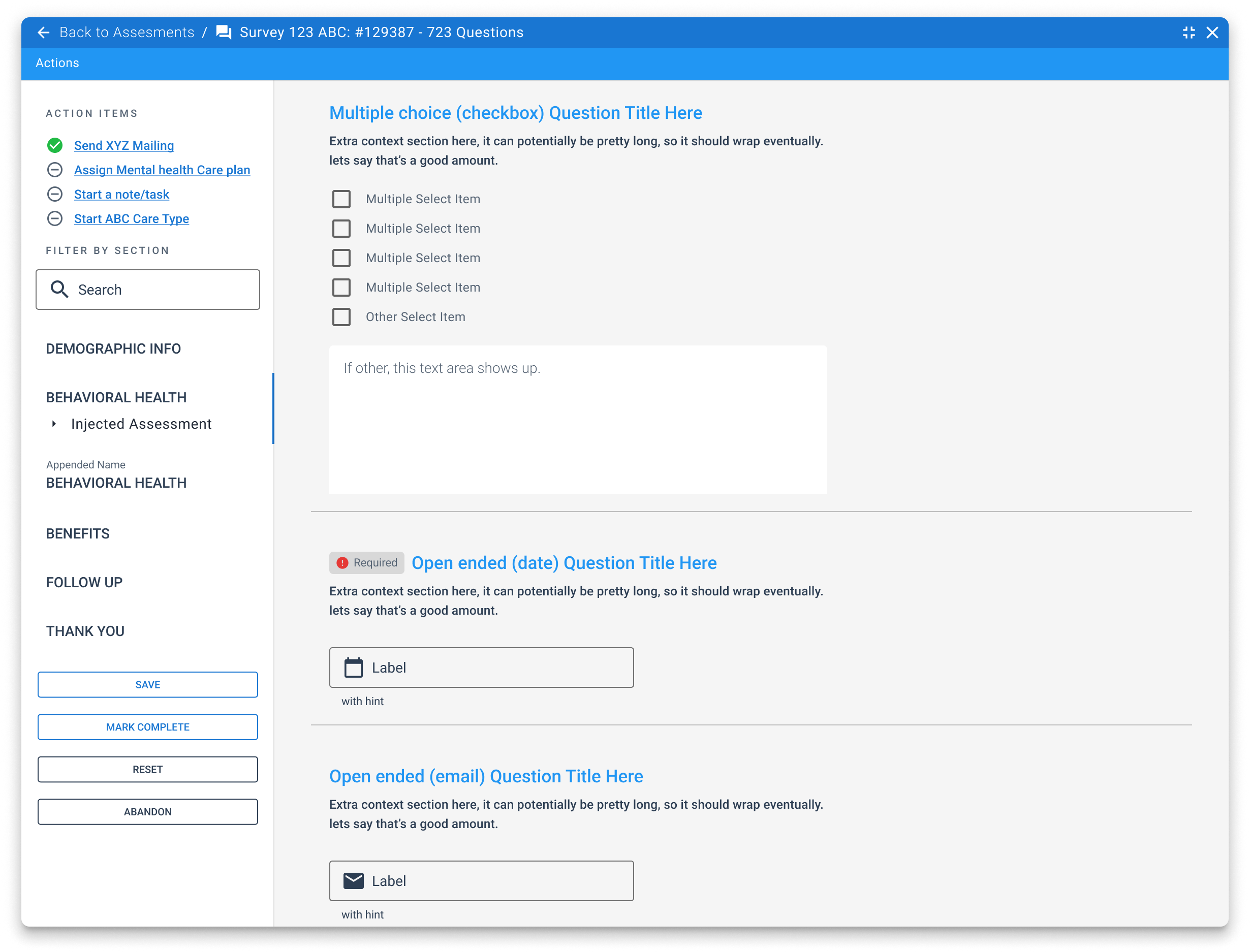
Sectioned completion keeps long instruments resume-friendly. Actions sit beside answers so finishing a survey can start the next operational step. Configuration owns authoring; this surface is the runtime.
Product model
- Universal blocks, many purposes: the same engine serves care-management assessments, intake surveys, and program-specific instruments.
- Sectioned completion: left-rail sections (demographics, behavioral health, benefits, follow-up) keep long instruments scannable and resume-friendly.
- Actions alongside answers: completing or branching a survey can trigger mailings, care-plan assignment, notes/tasks, or care-type starts. Assessment feeds the next step of care.
- Author once, run many: configuration defines libraries and conditions; operators and members get a consistent runtime.
Question system design
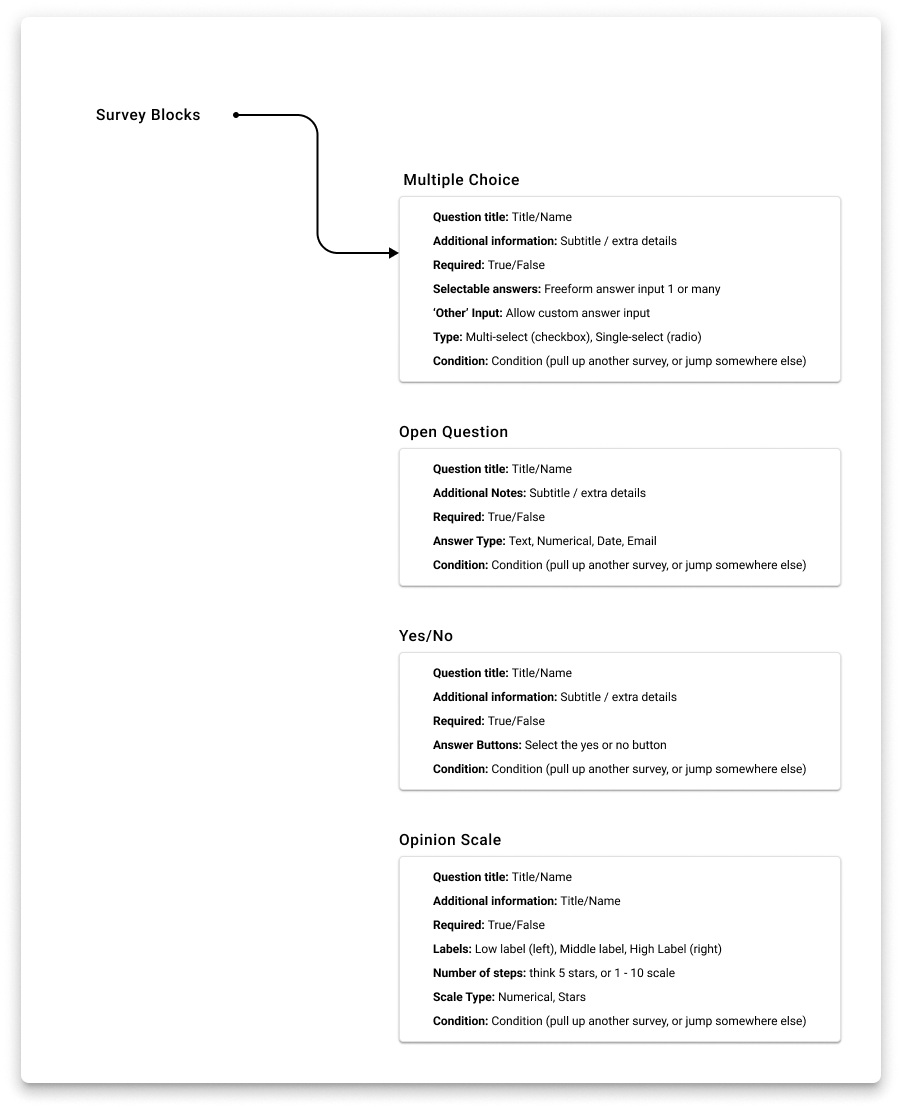
Rather than hard-coding screens, the product is built from reusable survey blocks with a shared metadata model: title, helper text, required flag, answer shape, and conditions (inject another section or jump elsewhere).
Block types
- Multiple choice: single or multi-select, optional “other,” freeform answers.
- Open question: text, number, date, email with field-level hints.
- Yes / no: binary decisions that often drive branching and actions.
- Opinion scale: numeric or star scales with low/mid/high labels.
- Extensions: document upload, legal/context sections in the config library for richer instruments.
Runtime UX decisions
- Progress without anxiety: section list + search lets people jump while still seeing incomplete structure.
- Injected assessments: nested instruments (for example behavioral health) appear in context rather than as a separate product tour.
- Lifecycle controls: save, mark complete, reset, and abandon. Explicit states for regulated workflows where partial data is common.
- Action items rail: completed triggers surface next operational steps so the survey stays tied to care outcomes, not only data capture.
Results
- One survey substrate for care management and adjacent programs instead of a pile of custom forms.
- Assessment completion wired to care-plan and task workflows. Closing the gap between “data collected” and “member acted on.”
- Paired with universal configuration so plans can evolve instruments without engineering every new question set.
Why this still matters
If every program needs a custom form, eng never keeps up and answers die in a PDF. A block engine with conditions and next-step actions means plans can author instruments and still turn completion into care-plan and task work.
Related work
This is the capture half of a larger system. Universal configuration authors assessments, libraries, and care plans; care management is the operational journey those assessments feed.
Stack
Vue · Quasar · design system · FHIR-informed care models · SME co-design · usability testing