The problem
Configuring a large healthcare ops platform was painful in a familiar way: multiple windows, deep tab stacks, and domain-specific admin UIs that taught nothing reusable. As care management, assessments, and program models grew, each new entity risked another silo. Training cost, error rate, and eng load all went up for multi-tenant (carrier / umbrella) setups.
The goal was explicit: one interface pattern that can take whatever configuration the product needs, safe enough for non-engineering plan admins.
Research
- Admin task analysis
- Config-error / training pain audits
- Object-model IA workshops
- Multi-tenant scenario walks
- Preview / save usability checks
I looked at how configuration actually fails with plan admins and implementation teams: windows everywhere, tabs that never taught a pattern, training cost climbing with every new entity. Scenario walks across carriers made tenant context non-negotiable. Workspace context stays visible in the shell, not buried in a setting.
What I owned
Product design for the configuration layer that enables care management and the universal survey tool. IA, object model presentation (lists → detail → sub-resources), and shared patterns for enablement, preview, and save across care plans and assessments.
Approach
One admin shell for care plans, assessments, and programs—so plan admins aren’t relearning a new UI every time.
Hypothesis: same shell, different objects, with tenant scope always visible. Goal: admins shape product behavior without one-off screens or accidental cross-tenant edits.
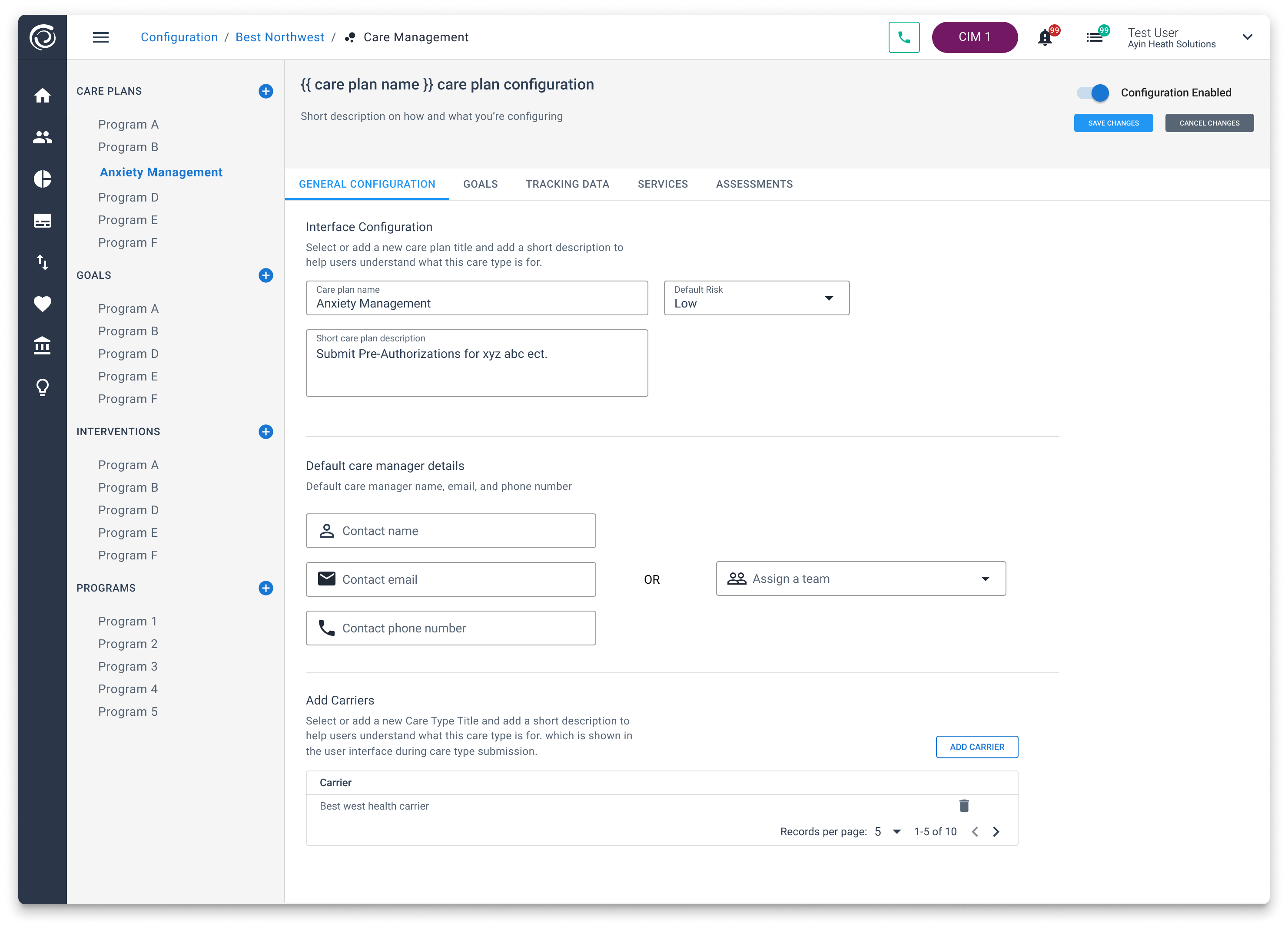
- Same shell, different objects: left nav groups (care plans, goals, interventions, programs, assessments, question libraries) share navigation, layout, search, and create.
- Tenant-aware context: breadcrumb and carrier scope make multi-tenant edits explicit. What you configure is always for a known client.
- Enable without deploy: toggles and save / cancel / preview keep changes deliberate and reversible.
- Author → runtime loop: preview assessment and weighted answers connect configuration to the survey runtime operators use.
Care plan configuration
Care plans are first-class products you configure, not a pile of disconnected settings. Name, default risk, description, default care manager (or team), carrier associations. Tabs split the hard parts: general, goals, tracking data, services, assessments. Complex programs stay navigable.
- Program list as the inventory (Anxiety Management, Program A–F…).
- Goals and interventions reusable across programs instead of copy-pasted screens.
- Carrier table so the same care-plan definition can roll out multi-payer.
Assessment configuration
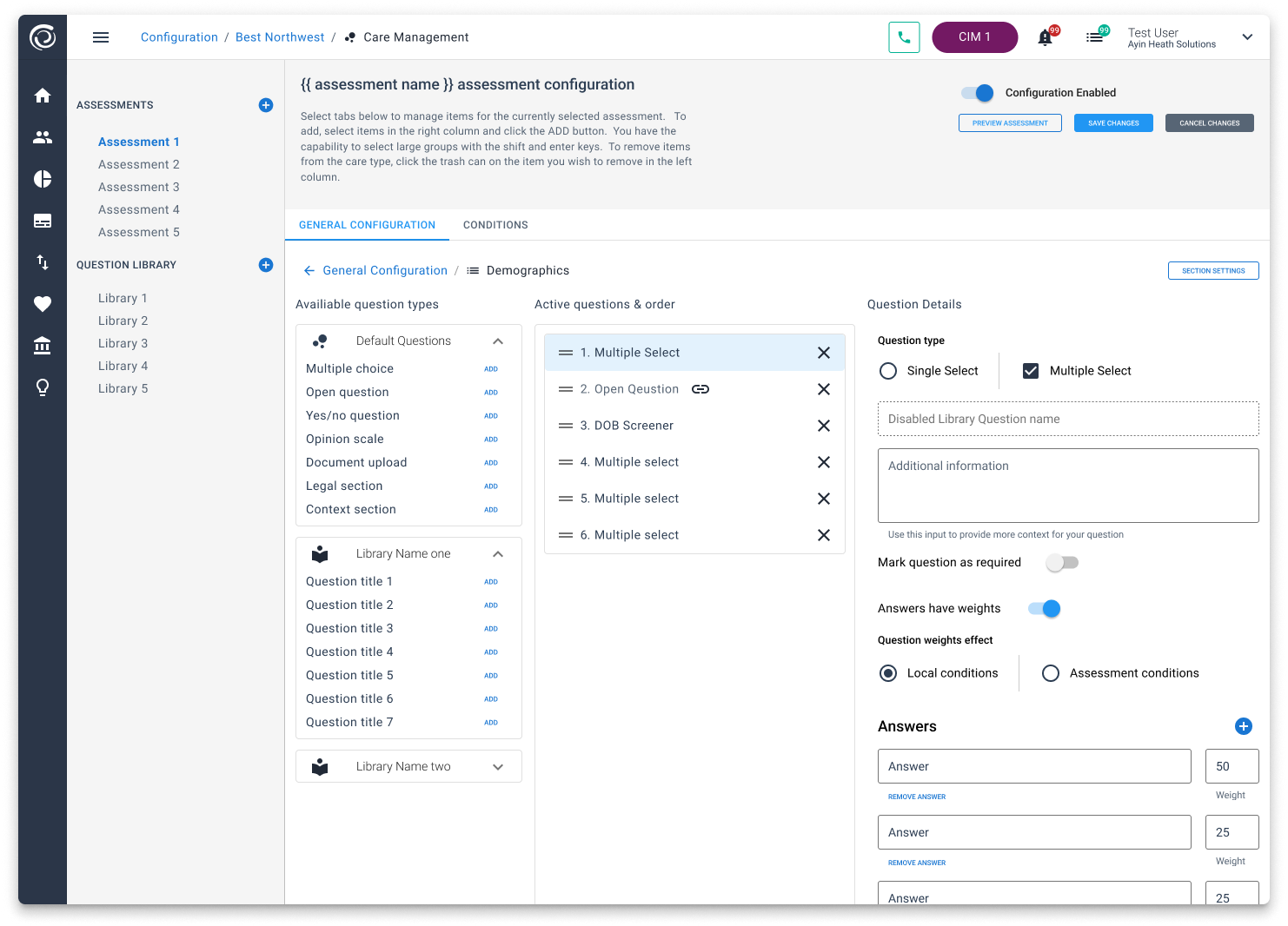
Assessment authoring reuses the same shell with a three-column builder: available question types and libraries, active question order, and question detail (type, required, weights, conditions).
Authoring decisions
- Libraries vs. one-offs: default types plus named libraries so common clinical and demographic questions get reused, not retyped.
- Order as product behavior: drag handles and remove controls. Sequence isn’t an afterthought.
- Weights & conditions: answer weights drive local or assessment-level scoring and branching without custom code.
- Preview: admins see the instrument the way end users will before it hits production workflows.
How the pieces connect
Configuration is where programs and instruments get defined. Care plans say what exists; assessments say how risk and needs get measured; the survey runtime and care-management views consume those definitions. Designing the admin once meant fewer one-off settings screens every time a new program type landed.
Results
- Unified configuration IA across care plans and assessments in a multi-tenant CIM environment.
- Plan admins get a predictable path: select entity → edit sections → preview → save, instead of hunting disconnected tools.
- Unblocked care-management delivery that depended on configurable plans and instruments (design moved in parallel with those programs).
Why this still matters
Plan admins shouldn’t relearn a new settings UI for every domain. One shell, always-visible tenant context, and preview before publish keeps multi-tenant config safer and easier to train—and leaves eng free to add entities without inventing another admin maze.
Related work
Universal survey tool is the runtime this powers. Care management is the member journey those plans and assessments enable. CIM UX lab is where denser ops patterns get stress-tested.
Stack
Vue · Quasar · multi-tenant admin IA · design system · care-plan & assessment domain models